Trade Discounts
Section: Omnichannel Sales & Manufacturing
URL:/admin/omni_sales/trade_discount
Page title: (2) Discounturi comerciale
Overview
Trade-discount rules applied automatically to omnichannel orders.
Business value
Trade-discount rules applied automatically to omnichannel orders — e.g. "10% off for distributors", "free shipping over €100".
- Who uses it: E-commerce manager, sales operations, marketing
- Key benefit: Promotional pricing without coding or manual order edits.
Typical use cases:
- Black Friday 20% promo across all channels
- Distributor pricing on B2B portal
At a glance

Accessing this module
From the admin sidebar, navigate to Trade Discounts, or open the URL directly:
/admin/omni_sales/trade_discount
List view
The list view shows existing trade discounts records. Use it to search, filter, sort, and bulk-act on items.

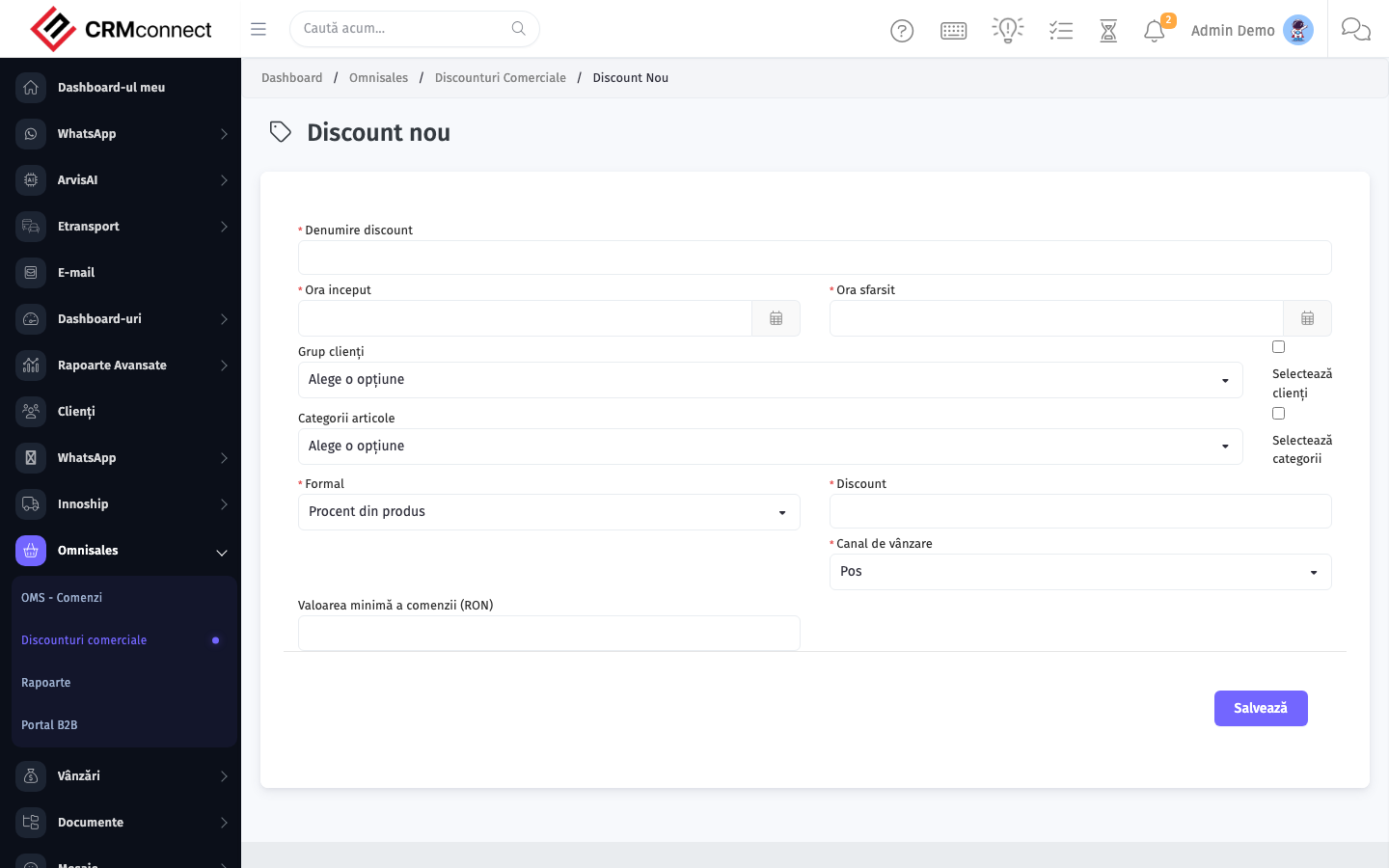
Create / edit form
Open the create form to add a new trade discounts record. Editing an existing record uses the same form pre-populated with current values.
Common actions
- View existing records — open Trade Discounts from the sidebar to see the list view.
- Search and filter — use the search box and column filters to find records.
- Create a new record — click the Add / New button (or follow the "Create" URL above) and fill in the required fields.
- Edit a record — click a row to open the detail view, then use the edit action.
- Delete a record — use the row's delete action; deletion may be soft or hard depending on the module.
- Bulk operations — select multiple rows via the checkboxes and apply a bulk action from the toolbar (export, delete, status change, etc., where supported).
Channel and order-type targeting
Trade discounts in CRMConnect are scoped to a sales channel and/or order type, which makes them distinct from simple price-list discounts:
- Sales channel — e.g. "Web shop", "B2B portal", "Marketplace". A discount rule fires only when the order originates from the configured channel.
- Order type — e.g. "Wholesale", "Retail", "Drop-ship". Lets you apply different commercial terms to different customer categories without creating separate price lists.
- Combination rules — a rule can match on channel alone, order type alone, or both together for maximum precision.
This channel-aware logic is the key differentiator from the general discount fields available on standard sales orders.
API
This module is available via the REST API.
Authentication. All API requests require the header authtoken: <token> (generate one at /admin/api/api_management).
Base URL. https://your-domain.tld/api/
Key endpoints:
| Method | Path | Purpose |
|---|---|---|
GET |
{{base_url}}omni_sales/orders?page=1&per_page=50 |
List |
GET |
{{base_url}}omni_sales/orders/{{omni_record_id}} |
Get one |
POST |
{{base_url}}omni_sales/orders |
Create (Not allowed) |
PUT |
{{base_url}}omni_sales/orders/{{omni_record_id}} |
Update status |
DELETE |
{{base_url}}omni_sales/orders/{{omni_record_id}} |
Delete (Not allowed) |
GET |
{{base_url}}omni_sales/order_types?page=1&per_page=50 |
List |
GET |
{{base_url}}omni_sales/order_types/{{omni_record_id}} |
Get one |
POST |
{{base_url}}omni_sales/order_types |
Create |
PUT |
{{base_url}}omni_sales/order_types/{{omni_record_id}} |
Update |
DELETE |
{{base_url}}omni_sales/order_types/{{omni_record_id}} |
Delete |
GET |
{{base_url}}omni_sales/sales_channels?page=1&per_page=50 |
List |
GET |
{{base_url}}omni_sales/sales_channels/{{omni_record_id}} |
Get one |
GET |
{{base_url}}omni_sales/sales_channels/search/{{search_key}} |
Search |
POST |
{{base_url}}omni_sales/sales_channels |
Create |
PUT |
{{base_url}}omni_sales/sales_channels/{{omni_record_id}} |
Update |
DELETE |
{{base_url}}omni_sales/sales_channels/{{omni_record_id}} |
Delete |
GET |
{{base_url}}omni_sales/channel_products?page=1&per_page=50 |
List |
GET |
{{base_url}}omni_sales/channel_products/{{omni_record_id}} |
Get one |
POST |
{{base_url}}omni_sales/channel_products |
Create |
PUT |
{{base_url}}omni_sales/channel_products/{{omni_record_id}} |
Update |
See the full payload schemas, query parameters, and example responses in the API reference (Omni Sales).
Captured: 2026-05-10T09:51:26.776Z · Source: demo.crmconnect.io/admin/omni_sales/trade_discount